.png?width=500&height=97&name=Firehouse247-Horizontal%20Logo@2x%20(2).png)
Overview
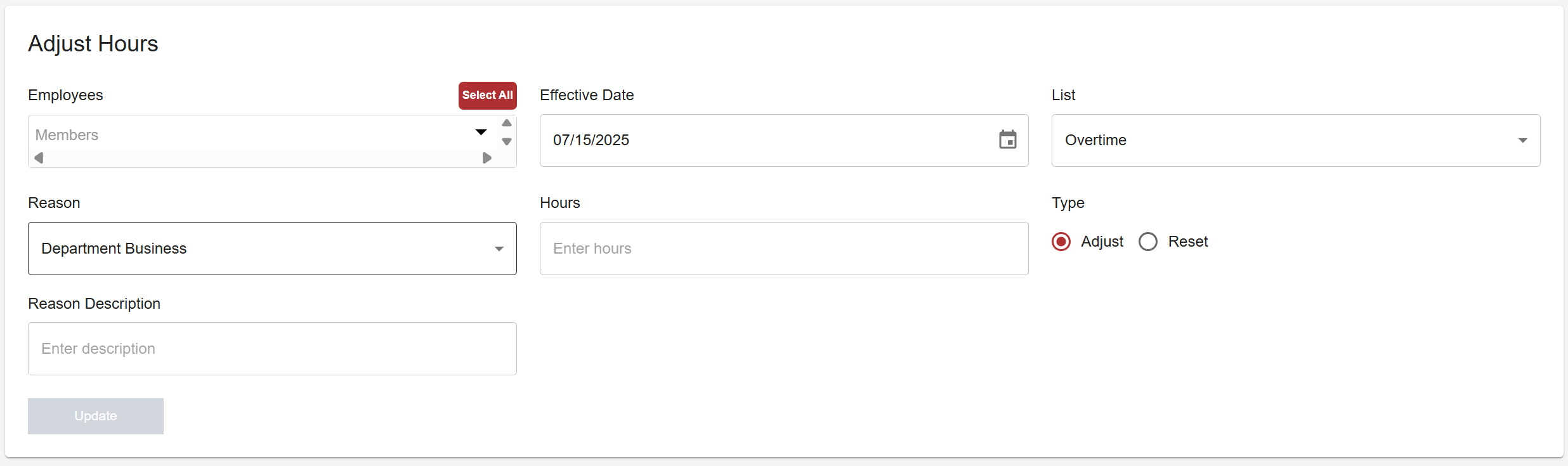
The Adjust Hours page allows you to manually update overtime or box hours for individual members or groups. You can increase or decrease hours, or reset them to a specific number. This is useful for handling corrections, retroactive changes, or contract-based adjustments.
Prerequisites
-
Admin or Officer access with authority to manage member hours
-
Knowledge of which list the adjustment applies to (e.g. Overtime, Detail)
-
A clear understanding of whether you are adjusting or resetting hours
Step-by-Step Instructions
1. Open the Adjust Hours Page
-
Navigate to the Adjust Hours section from the admin menu
2. Select the Member(s)
-
Click the member’s name to select
-
To select multiple members, highlight multiple checkboxes
-
The button select all is used if a full list needs to be reset
3. Fill Out the Adjustment Details
-
Effective Date: When the change should take effect
-
List Type: Choose the applicable list (e.g. Overtime, Payback)
-
Reason: Provide a clear reason for auditing and transparency
-
Quantity: Enter the number of hours or boxes to change
-
A positive number will add hours to a list and a negative number will subtract numbers from a list
-
-
Adjustment Type:
-
Adjust – adds/subtracts hours from the current total
-
Reset – overrides and sets a new total
-
4. Click Update
-
The system will apply the changes and log them to the member’s profile
Important Notes
-
Double-check your Adjustment Type. Choosing Reset instead of Adjust (or vice versa) can result in incorrect totals for the member.
-
Changes made here are immediately effective as of the selected date.
-
All adjustments are logged for tracking and audit purposes.
Viewing Adjustments
To confirm the change:
-
Go to the Members page
-
Select the member
-
View their log to see a timestamped record of the adjustment
Tips & Best Practices
-
Use “Reset” only when onboarding new members or correcting a major error
-
Always log a clear and consistent reason for any adjustment
-
For recurring adjustments (e.g. monthly bonus hours), maintain a written policy to avoid confusion