.png?width=500&height=97&name=Firehouse247-Horizontal%20Logo@2x%20(2).png)
Overview
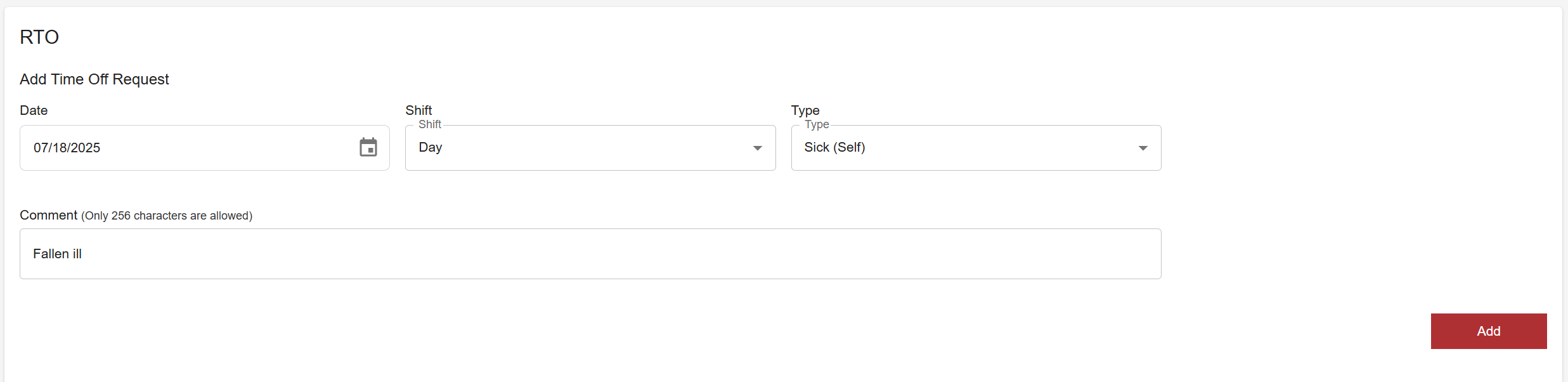
The Request Time Off page allows firefighters to submit formal leave requests to the shift commander for approval. Members must specify the date, shift type, leave category, and an optional reason. Once submitted, requests can be tracked from the My Shifts page and members will receive a notification when approved or denied.
Prerequisites
-
Must be logged into Firehouse247
-
Must have an active member profile
-
Date selection must be on a day your group is working
Step-by-Step Instructions
1. Navigate to the Request Time Off Page
-
From the main menu, go to Request Time Off
2. Fill Out the Time Off Form
Enter the following:
-
Date: The date you wish to take off (submission will not process if the date requested is not a date your group works)
-
Shift Type: Choose from
-
24-Hour
-
Day
-
Night
-
Custom
-
-
Leave Type: Select the type of leave (e.g. Vacation, Personal, Sick, Military)
-
Reason (Optional): Enter a short note (up to 200 characters) to explain your request
? This reason will be visible to admins when they review your request.
3. Submit the Request
-
Click Submit
-
Your request will be sent to the shift commander for approval
What Happens Next
-
You will receive a notification once your request is either approved or denied
-
All submitted requests can be tracked in the My Shifts page under the Time Off section
Tips & Best Practices
-
Submit time off as early as possible - especially for high-demand dates
-
Use clear, concise reasons when appropriate (e.g. “Family event” or “Medical appointment”)
-
Double-check your selected shift type and date before submitting