.png?width=500&height=97&name=Firehouse247-Horizontal%20Logo@2x%20(2).png)
Overview
The Volunteer Sign-Up Form is designed for members in volunteer or combination departments to submit their availability for upcoming on-call shifts. This tool ensures administrators have up-to-date availability when assigning coverage, particularly for open day, night, or 24-hour shifts.
Prerequisites
-
Must be part of a volunteer or combination department configuration
-
Must be logged into Firehouse247
-
Availability must be submitted before assignment to be editable
How to Submit Your Availability
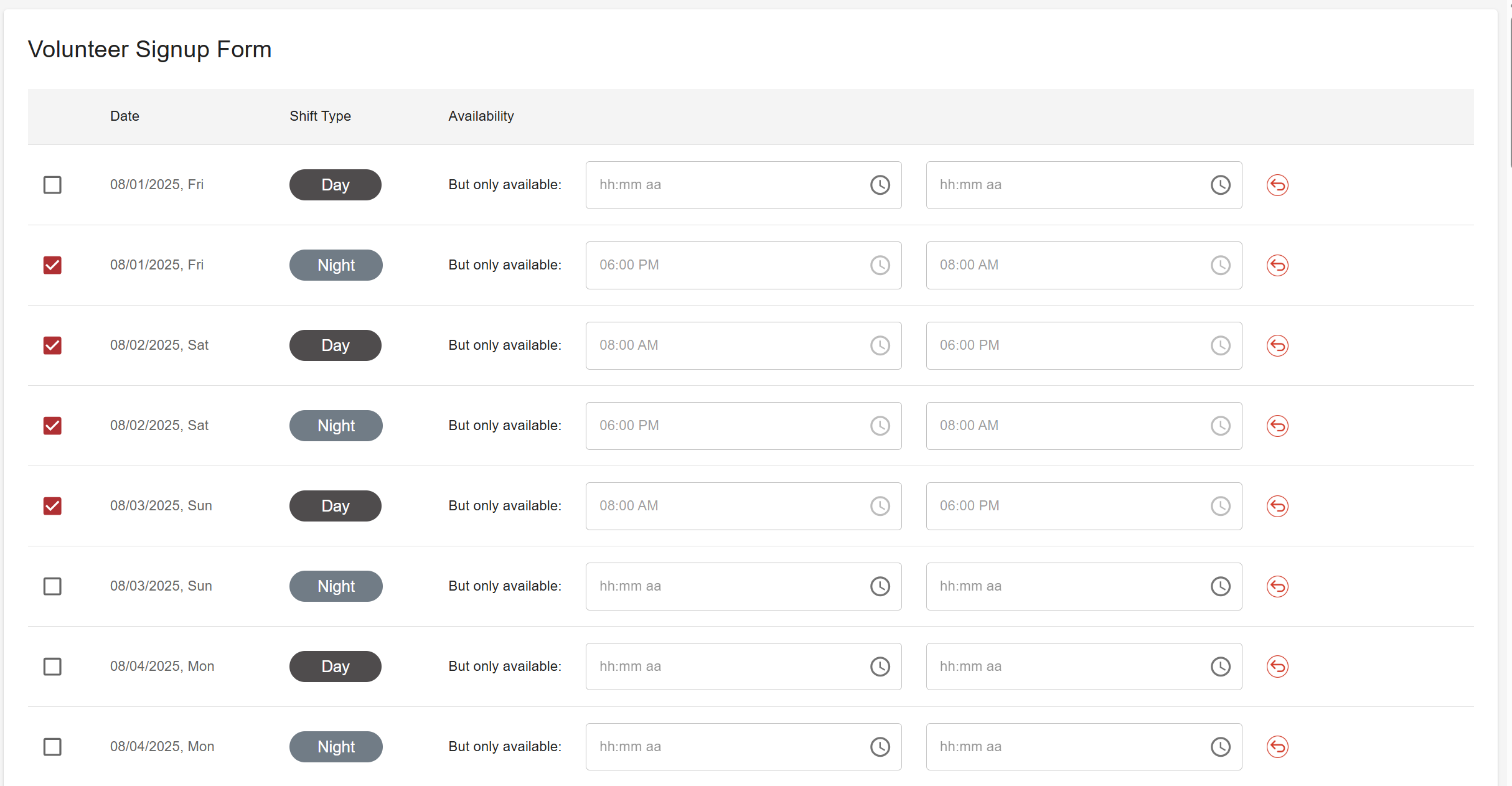
1. Access the Volunteer Sign-Up Form
-
Navigate to Volunteer Sign-Up from the main menu
2. Understand the Table Layout
Each row contains:
-
Date of Shift
-
Shift Type – Day, Night, 24-Hour, or Other (depending on configuration)
-
Availability Field – For entering custom timeframes
3. Select Your Availability
You have two options:
-
Full Shift Selection: Click the checkbox next to a shift to submit availability for the full time block
-
Custom Timeframe:
-
Enter the desired time range into the availability field (e.g., 09:00–13:00)
-
Note: If you select the checkbox before entering a time, custom input will be disabled for that row
-
? Custom time must be entered first if not committing to the full shift.
4. Click Save
-
Your availability will now be submitted to the system and visible to administrators during scheduling
Modifying or Removing Your Availability
If you haven’t yet been assigned to a shift:
-
Return to the form
-
Deselect the checkbox or remove the custom time
-
Click Save again to update or remove your availability
Tips & Best Practices
-
Always submit availability early to ensure you're considered during shift assignments
-
Use clear and accurate time entries for partial availability
-
Check My Shifts regularly to see if you’ve been assigned or if you need to adjust entries